Z·03Web Security
Zilk Security Assessment Tool
A pentest-grade report in 15–30 minutes. No security team required.
Enter a URL. ZSAT fingerprints your technology stack, runs a comprehensive battery of industry-standard security tests in parallel, correlates the findings with AI to eliminate duplicates and false positives, and hands you a professional branded report — with copy-paste remediation code for your exact server and CMS.
Who it’s for: Teams that need a pentest-grade web security report in 15–30 minutes, without a dedicated security team or a multi-week engagement.
The Zilk Difference
Why Zilk Security Assessment Tool
01
Weeks of pentest, in minutes
Compresses a multi-week manual penetration test into a 15–30 minute automated scan at a fraction of the cost.
02
AI-correlated findings
AI correlation removes the duplicate-and-false-positive noise that makes raw scanner output hard to action.
03
Copy-paste remediation
Delivers exact, copy-paste remediation for the customer's detected server and CMS rather than generic advice.
04
White-label, multi-tenant
White-label reporting and multi-tenant projects make it a turnkey offering for agencies and MSPs.
Capabilities
What Zilk Security Assessment Tool does
One-click scanning
Point ZSAT at a verified domain and get results in minutes; scans run asynchronously in the background so you can poll or watch the dashboard.
AI finding correlation
Deduplicates findings across all checks, assigns CVSS scores, correlates attack chains, and filters out false positives.
Technology fingerprinting
Detects the CMS, CDN, WAF, web server, and programming language behind a site to tailor findings and fixes.
Security header analysis
Evaluates ten HTTP security headers, flags missing or weak ones, and catches information-disclosure headers and short HSTS lifetimes.
Stack-specific remediation
Every finding ships with a description, severity, evidence, and ready-to-paste Nginx, Apache, IIS, or CMS configuration code.
Compliance mapping
Findings map to OWASP Top 10, PCI-DSS, SOC 2, and ISO 27001 in every report.
Domain ownership verification
Three verification methods — DNS TXT record, HTML meta tag, or file upload — ensure you only scan sites you own.
Multi-tenant dashboard
Organizations, role-based access, and project-based scan grouping with vulnerability charts, scan history, and per-domain breakdowns.
Product tour
Thirteen modules. One scanner.
Hover to pause, click any frame to inspect it full size.
Live demo
Watch it work — then step through every screen
Captured from the live product, then a slideshow that plays on its own — click any slide to zoom in. Real product, demo data.
Security Overview
Use cases
Where teams put Zilk Security Assessment Tool to work
- 01
A small business without a security team gets a professional, board-ready vulnerability report on its website in under half an hour.
- 02
A web agency runs white-labeled scans for its clients and hands over branded reports with copy-paste fixes for each client's stack.
- 03
A team preparing for SOC 2, ISO 27001, or PCI-DSS uses the compliance-mapped findings as audit evidence and a remediation checklist.
- 04
A developer schedules recurring re-scans to track which vulnerabilities were fixed and which are new over time.
- 05
An MSP centralizes scanning across many customer domains in one multi-tenant dashboard with role-based access.
Specifications
Technical specifications
- Delivery
- SaaS — hosted at scan.zilk.ai
- Turnaround
- ~15–30 minutes per scan; scan depths: quick, standard, deep
- Reports
- PDF and DOCX, white-labelable
- Compliance mapping
- OWASP Top 10, PCI-DSS, SOC 2, ISO 27001
- Scan execution
- Asynchronous background scanning; track progress in the secure portal or via API
- Findings
- Severity ratings (critical/high/medium/low/info), CVSS scoring, evidence, remediation steps, and config code snippets
- Access control
- Organizations with a four-level role hierarchy (owner, admin, member, viewer)
- Security posture
- Encrypted TLS transport, enforced rate limiting, and strict browser security headers (HSTS, CSP)
- License
- Proprietary — Zilk
Part of our Cybersecurity Services practice
Zilk Security Assessment Tool is built and supported by the same engineers who deliver our 31 Cybersecurity Services services — design, deployment, and day-2 operations included.
Explore further
Where Zilk Security Assessment Tool fits
Related solutions
Security Transformation
Find the exposure, close it, and keep it closed — across the digital estate and the physical site.
66 services · Cybersecurity Services · Physical Security & Surveillance
Build & Deliver
Ship the product and put it in front of the market — engineering across the web stack, then the growth programme around it.
107 services · Programming Languages & Web Tools · Digital Marketing
Advisory
Assessment, architecture, and governance work that decides what to build before anyone builds it.
18 services · Consulting Services
Related services
- 31services
Cybersecurity Services
Zilk Security Assessment Tool (ZSAT) vulnerability scanning, assessments and remediation, plus NDR, EDR, XDR/SIEM, security migrations, consulting, compliance, and AI-powered security
- 18services
Consulting Services
Advisory and upgrade services for networks, applications, infrastructure, systems, and storage
- 47services
Programming Languages & Web Tools
Full-stack development talent covering programming languages, front-end frameworks, back-end platforms, databases, and website building tools
The story
From URL to audit-ready — five screens
Keep scrolling — the dashboard follows the story.
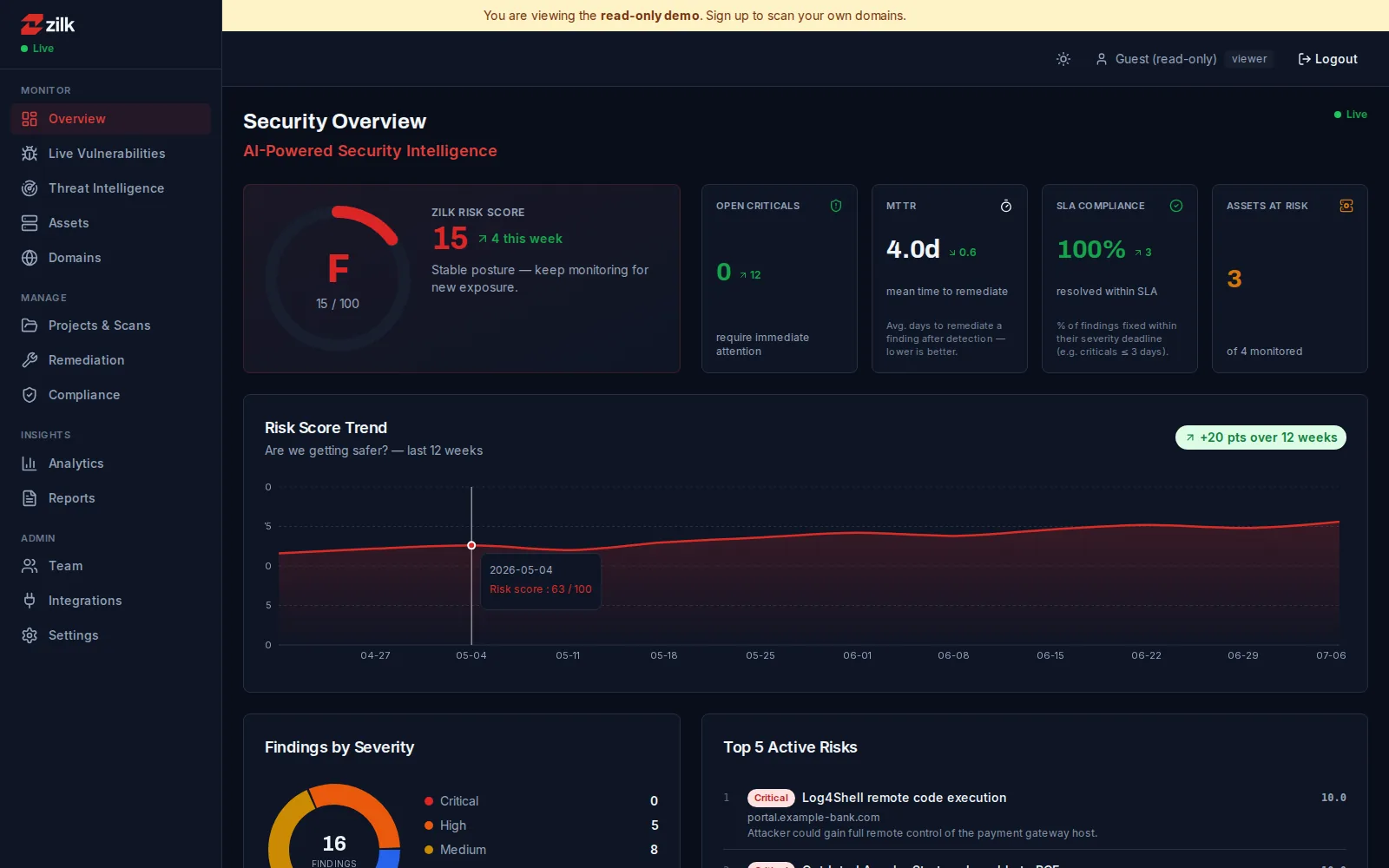
01 · Posture
Know where you stand in one glance
The Zilk Risk Score grades your whole attack surface A–F, next to the numbers a CISO actually reports: open criticals, mean time to remediate, and SLA compliance — live.
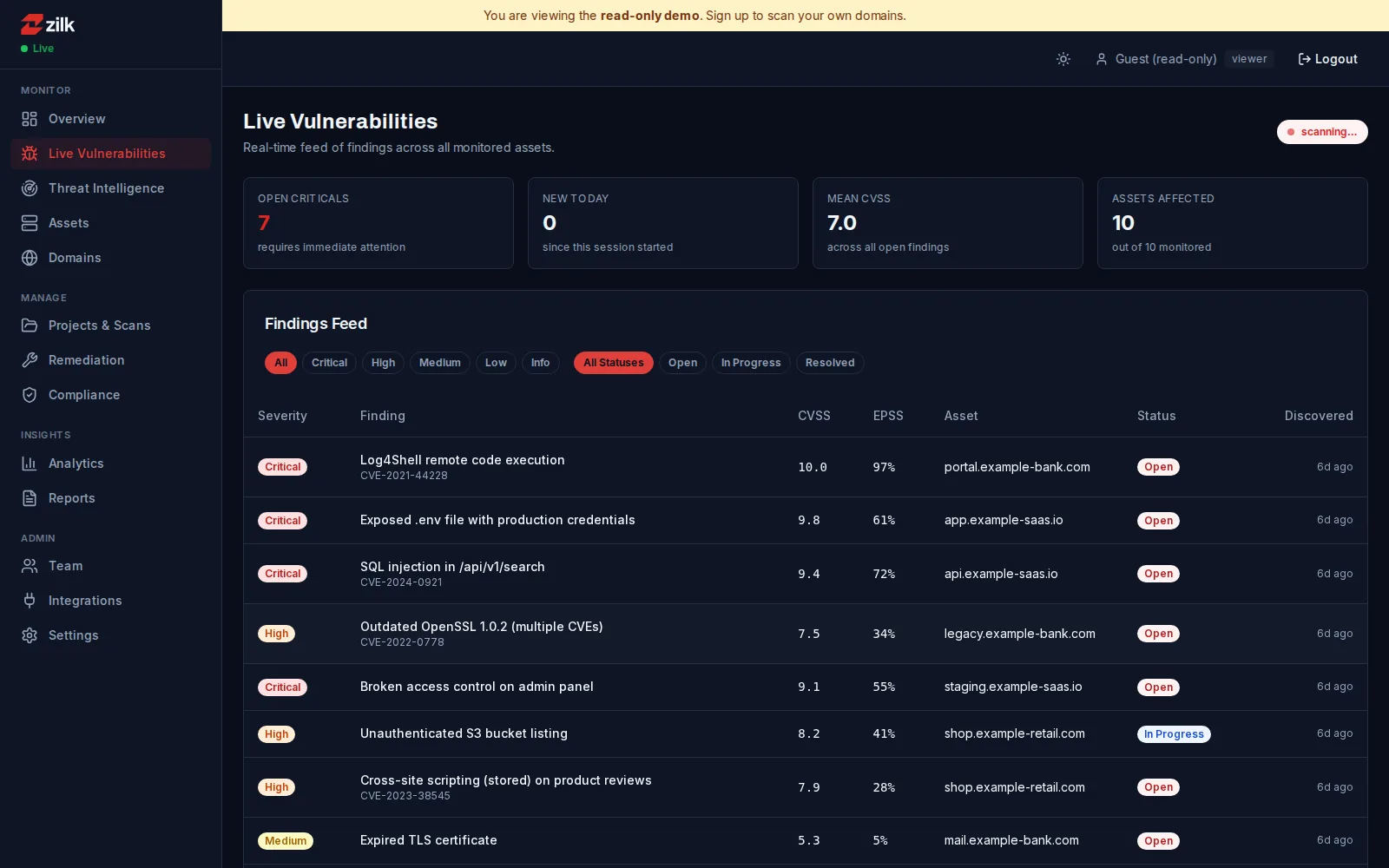
02 · Findings
A live feed of what is actually exploitable
Findings stream in while the scan runs, each scored with CVSS and EPSS and tied to the asset it affects — filter by severity or status and watch criticals surface first.
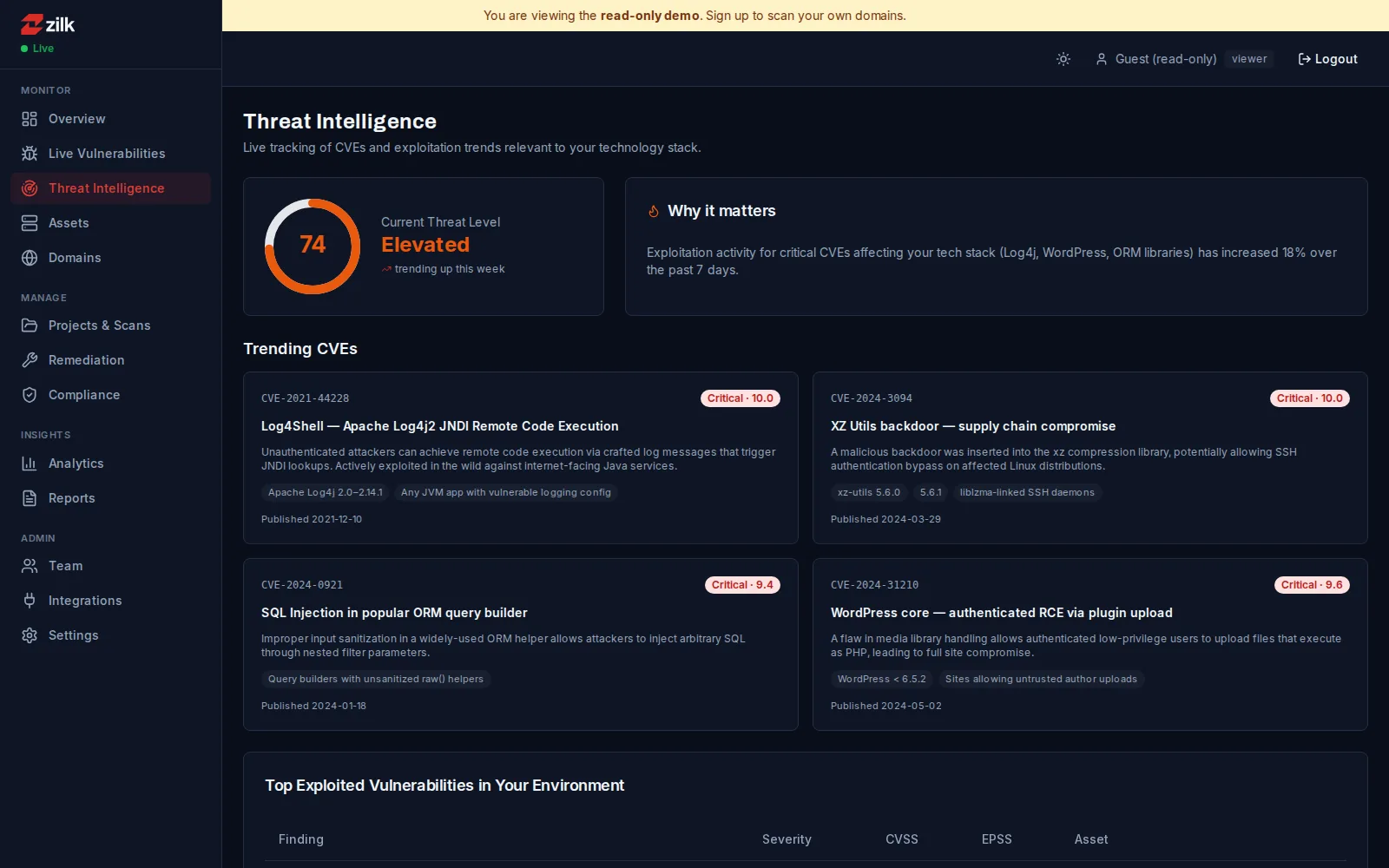
03 · Threat intel
CVEs scoped to your stack — not the whole internet
ZSAT fingerprints your technology, then tracks the threat level and trending CVEs that touch it, so Log4Shell-class events reach you with context instead of noise.
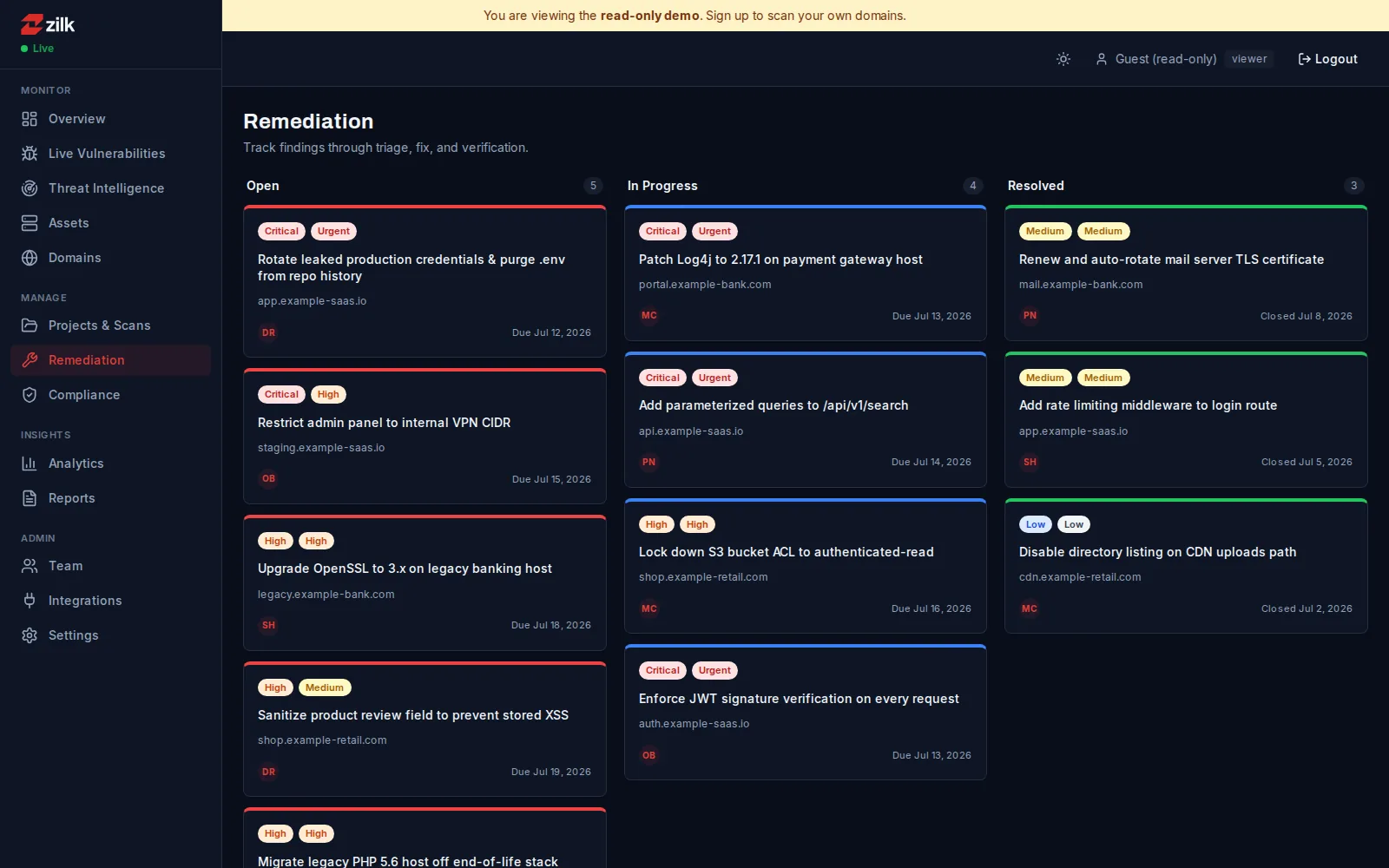
04 · Remediation
Fixes you can paste, not homework
Every finding ships with remediation for your exact server and CMS — Nginx, Apache, IIS, WordPress — tracked from open to verified-fixed.
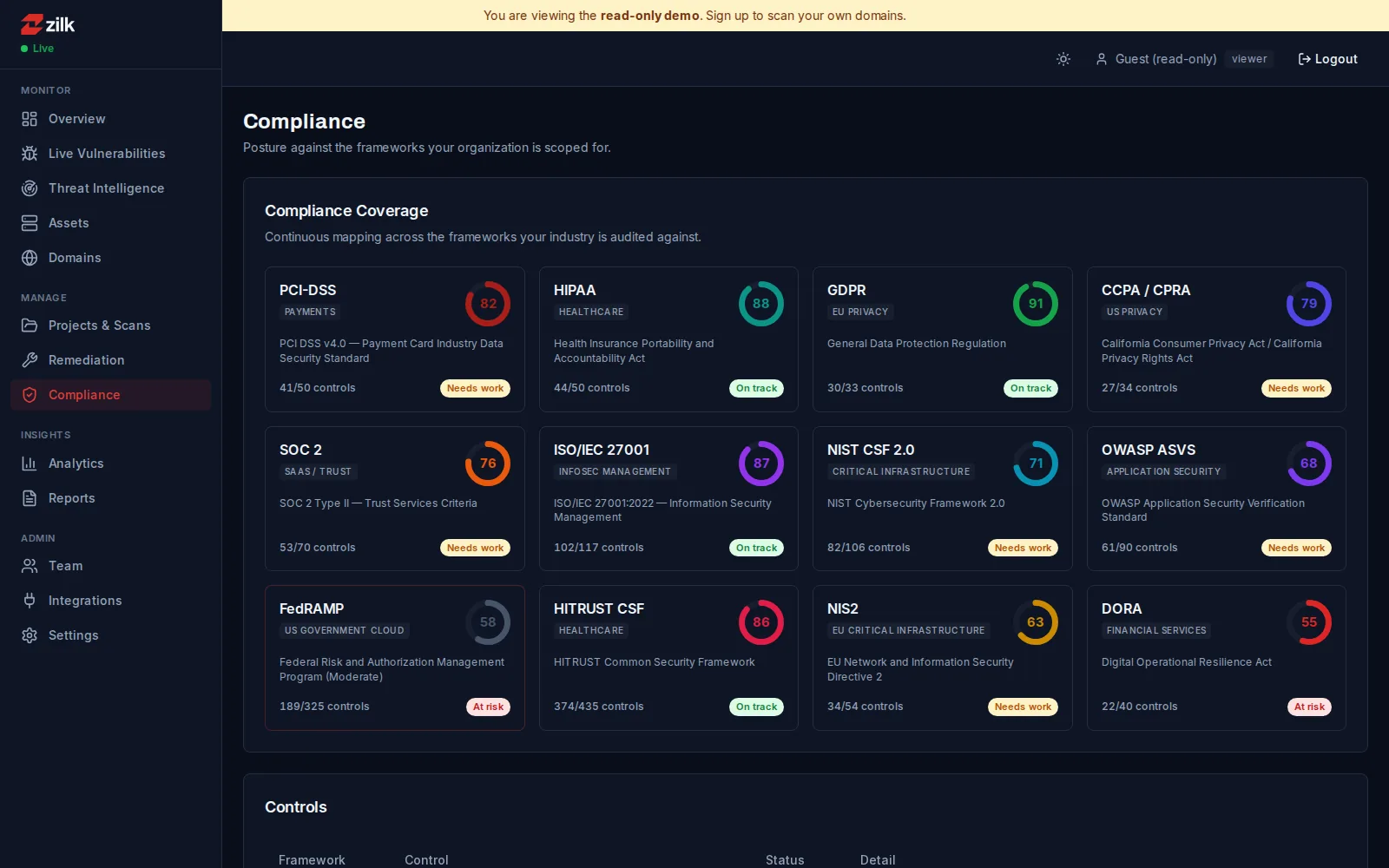
05 · Compliance
Audit-ready across the frameworks you are scoped for
Continuous control mapping across PCI-DSS, HIPAA, GDPR, SOC 2, ISO 27001, NIST CSF and more — posture per framework, with what needs work called out.
Pricing
Request pricing for Zilk Security Assessment Tool
Tell us a little about your team and what you need — an engineer replies with pricing, typically within one business day.
Put Zilk Security Assessment Tool to work
See it against your own environment, ask the hard questions, and get a straight answer on fit.